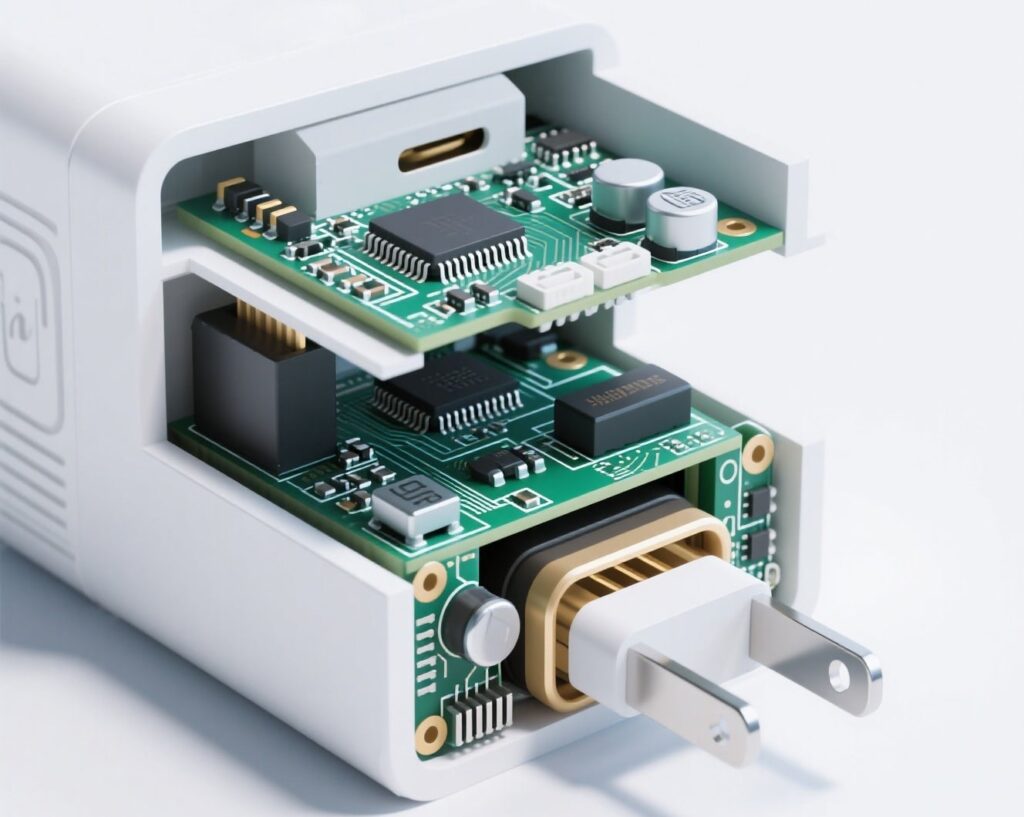
The Ultimate Guide to Buying the Best Travel Charger for Phones and Laptops in 2026

Gan Travel Chargers

Gan Travel Chargers

Introduction: Why Your Old Travel Charger Isn’t Cut Out for Travel

Picture this: You’re in a crowded airport during a layover, your laptop battery is at 5%, and your phone isn’t far behind. You scramble for an outlet, only to find you’ve packed a tangle of slow, bulky travel chargers that take forever to power one device, let alone all of them. This modern travel nightmare is entirely avoidable.

The right travel charger is no longer a luxury; it’s a necessity. It’s the command center for your digital life on the road, capable of juicing up your smartphone, laptop, tablet, and headphones simultaneously, quickly, and safely—all from a single, compact device that fits in your pocket.

This comprehensive guide will walk you through everything you need to know to invest in a perfect travel charger for your needs, covering key specs, crucial features, and top recommendations to ensure you never face a dead device again.

Chapter 1: Understanding the Core Specifications of Travel Charger

Before you buy, you need to speak the language. These technical terms define a charger’s capability.

1. Wattage (W): The Powerhouse Metric

Wattage is the most critical factor determining charging speed. Simply put, higher wattage = faster charging, but only if your device can handle it.

  • Phones (iOS & Android): Most modern smartphones support fast charging between 20W and 45W. A 20W charger will fill an iPhone much faster than the old 5W brick.

  • Tablets: Typically require 30W to 45W for optimal charging.

  • Laptops: This is where power needs jump. Most modern ultrabooks (MacBook Air, Dell XPS 13) need at least 45W-65W. Larger notebooks and gaming laptops may require 100W or more.

Pro Tip: For a future-proof charger that can handle a laptop and other devices, aim for a minimum of 65W. If you’re a power user with a high-performance laptop, look for 100W+.

2. USB Power Delivery (PD): The Universal Fast-Charging Standard

USB Power Delivery (USB-PD) is a universal fast-charging protocol that allows for higher power transfer over USB-C connections. It’s what enables a small charger to power a large laptop.

  • Why it matters: USB-PD is the standard for modern MacBooks, Windows ultrabooks, iPads, and high-end Android phones. If your charger and device both support USB-PD, they will negotiate the fastest possible charging speed.

  • Look for it: Ensure any charger you buy prominently features “USB Power Delivery” support.

3. Ports: Quantity and Type

The number and type of ports determine how many devices you can charge at once.

  • USB-C Ports: These are essential. Look for chargers with multiple USB-C ports, as they are used for high-speed data transfer and high-wattage charging. This is where your laptop will plug in.

  • USB-A Ports: While older, these are still useful for charging older devices like Bluetooth headphones, some fitness trackers, or for using older cables. A good travel charger should have at least one.

Aim for a charger with 2-3 ports minimum (e.g., 2x USB-C + 1x USB-A) to avoid carrying multiple chargers.

Chapter 2: Must-Have Features for the Modern Traveler

Beyond the basic specs, these features separate good chargers from great ones.

1. GaN Technology: Smaller, Cooler, and More Efficient

Gallium Nitride (GaN) is a revolutionary semiconductor material that has transformed charger design.

  • Smaller Size: GaN chargers are significantly smaller and lighter than traditional silicon-based chargers with the same power output. This is a game-changer for travel.

  • Greater Efficiency: They waste less energy as heat, meaning they run cooler and are often more reliable.

  • The Verdict: In 2025, always choose a GaN charger. The price difference is minimal, and the benefits for a traveler are enormous.

2. Compact and Foldable Design

A travel charger should be, above all, travel-friendly. A foldable plug (like those from Anker or Ugreen) is a brilliant feature that protects your bag and other items from getting scratched. Compactness ensures it doesn’t block adjacent outlets in crowded airport charging stations.

3. PPS Support: The Smart Charging Protocol

PPS (Programmable Power Supply) is an advanced protocol within the USB-PD 3.0 standard. It allows for minute adjustments in voltage, which increases efficiency and reduces heat generation. This is particularly important for Samsung Galaxy smartphones (like the S-series), which use PPS for their super-fast charging (45W). If you’re an Android user, look for PPS support.

4. International Compatibility (Voltage & Plug Adapters)

A true travel charger must work anywhere.

  • Input Voltage: Ensure it supports 100-240V input voltage. This is standard for most quality chargers and means it will work seamlessly with any voltage from the U.S. to Europe to Asia without a bulky separate voltage converter.

  • Interchangeable Plugs: Some advanced travel chargers (like the Zendure Passport) come with built-in, swappable plugs for US, EU, UK, and AUS outlets. This is incredibly convenient, eliminating the need for separate plug adapters.

Compact GaN Tech charger

Compact GaN Tech charger

Chapter 3: Safety and Reliability: Don’t Cut Corners

A cheap, uncertified charger can fry your $2,000 laptop. Never compromise on safety.

  • Certifications: Look for safety certifications like UL (Underwriters Laboratories), ETL, CE or other?. These indicate the product has been tested and meets specific safety standards.

  • Protections: Quality chargers include built-in protections against:
  • Overheating
  • Overcurrent
  • Overvoltage
  • Short circuits
  • Brand Reputation: Stick with reputable brands known for quality and customer service, such as Anker, Spigen, Satechi, Trunker, and Belkin. Their products may cost slightly more but offer peace of mind.

Chapter 4: Top Travel Charger Recommendations for 2025

Here are some top-tier options categorized by use case:

Product ExampleWattageKey FeaturesBest For
Anker 735 Charger (GaNPrime 65W)65W3 ports (2xC, 1xA), GaN II tech, compact foldable plugThe all-rounder: perfect for a MacBook Air/Pro and two other devices.
Ugreen Nexode 100W Charger100W3 ports (2xC, 1xA), GaN tech, PPS support, foldable plugPower users with a high-wattage laptop who need to charge multiple devices fast.
Zendure Passport III65W2 ports (1xC, 1xA), Built-in int’l plugs (US/EU/UK/AUS), GaNThe frequent international flyer who wants an all-in-one solution.
Anker 313 Charger (PowerPort III 20W)20WSingle USB-C port, incredibly compact and affordableThe minimalist traveler who only needs to fast-charge a phone.
Lider Travel Charger

Lider Travel Charger

Chapter 5: Putting It All Together: Your Buying Checklist

Before you click “buy,” run through this checklist:

  1. ✅ Wattage: Does it have enough power for my laptop (at least 65W) and devices?

  2. ✅ USB-PD: Does it support USB Power Delivery for fast laptop charging?

  3. ✅ Ports: Does it have enough ports (USB-C and USB-A) for all my gear?

  4. ✅ GaN: Is it made with GaN technology for a smaller size?

  5. ✅ Design: Is it compact with a foldable plug?

  6. ✅ Safety: Does it have necessary certifications (UL, ETL, CE or other)?

  7. ✅ Compatibility: Does it support 100-240V for international travel?

  8. ✅ Reviews: Have I checked verified customer reviews for real-world performance?
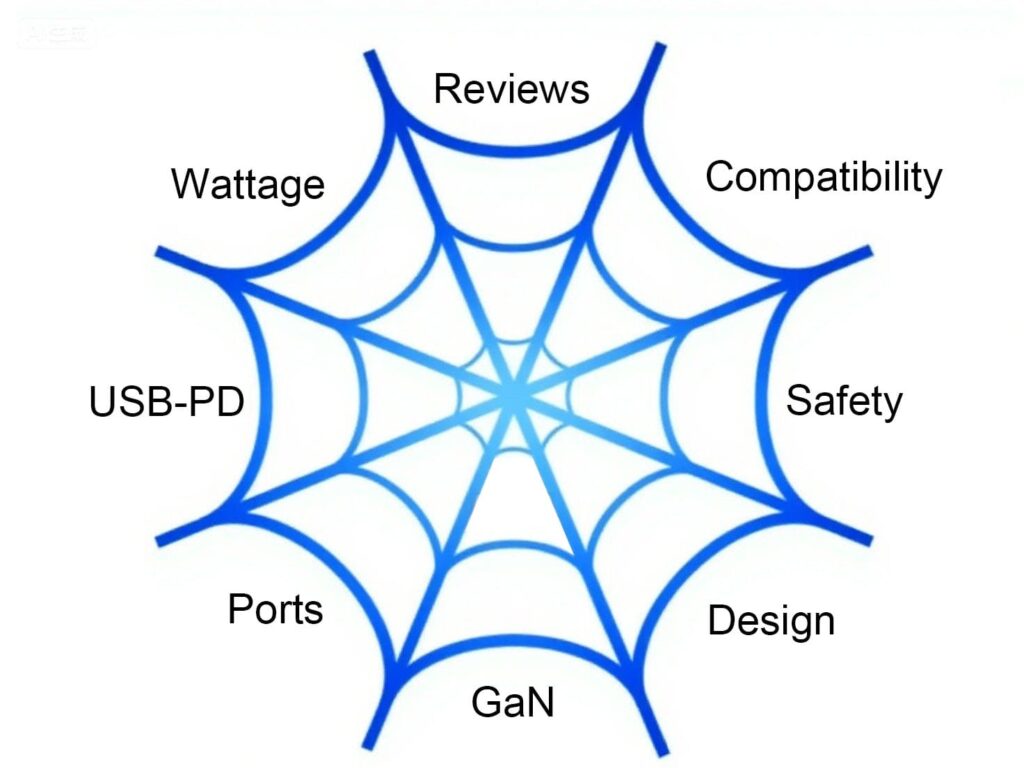
More to check

More to check

Conclusion: Invest in Your Connectivity

Your travel charger is the unsung hero of your go-bag. Choosing the right one—a powerful, compact, safe, and versatile GaN charger with multiple ports—will transform your travel experience. It declutters your bag, reduces your stress, and, most importantly, keeps you connected to the world, your work, and your loved ones, no matter where your journey takes you.

Ditch the bundle of old chargers and make the upgrade. Your future self, calmly working on a fully charged laptop while everyone else scrambles for an outlet, will thank you.

Ready to find your perfect travel charger? Use the guide and checklist above to compare top-rated models on Amazon or your favorite electronics retailer today!

The End of Charging Anxiety? Breakthroughs in Smartphone Battery Technology

Charging anxiety – For over a decade, the smartphone has evolved at a blistering pace. We’ve seen cameras transform into professional studio equipment, screens become dazzling windows to virtual worlds, and processors powerful enough to run complex games. Yet, one component has stubbornly lagged behind, a digital ball and chain holding back our mobile lives: the battery.

We all know the feeling. That sinking sensation when the red battery icon appears, the frantic search for an outlet, the heavy power bank weighing down a bag. This is “charging anxiety,” and it has been the unsolvable problem of the mobile era. But for the first time, a wave of genuine technological breakthroughs promises to consign this anxiety to the history books.

The revolution is happening on three fronts: speed, longevity, and fundamental chemistry.

1. The Speed Revolution: From 0 to 100 in Minutes

Fast charging is no longer a novelty; it’s a battlefield. While companies have raced to higher wattages (with some now boasting 100W, 150W, and even 200W speeds), the real innovation is in the intelligence behind the charge.

  • GaN (Gallium Nitride) Technology: The unsung hero of fast charging. GaN chargers are smaller, more efficient, and generate less heat than traditional silicon chargers. This allows them to deliver high power consistently without the risk of damaging your phone—or melting your outlet.

  • Intelligent Power Management: Your phone is no longer a passive recipient of power. Advanced chipsets now manage the charging process in real-time, regulating voltage and current based on the phone’s temperature and your usage patterns. This means you can safely get a 50% charge in the time it takes to drink your morning coffee.

The promise is no longer just “all-day battery,” but “a day’s power in minutes.”

2. The Longevity Revolution: Batteries That Refuse to Die

What good is a fast-charging battery if it dies in two years? Battery degradation—the slow loss of maximum capacity over hundreds of charge cycles—is the next frontier. Manufacturers are finally tackling this head-on.

  • Advanced Battery Health Algorithms: Companies like Apple and Samsung now use sophisticated software that learns your charging habits. Features like “Optimized Battery Charging” hold the phone at 80% until you need it, reducing the wear and tear caused by staying at 100% for prolonged periods.

  • Hardware Innovations: New designs with multiple battery cells and improved heat dissipation systems prevent the high temperatures that are a primary killer of battery health. The goal is a battery that retains over 80% of its capacity after 1,000 full cycles—effectively doubling its usable lifespan.

This shift means your next phone won’t just last a day on a charge; it will last years before feeling the need for a replacement.

3. The Chemistry Revolution: Beyond Lithium-Ion

This is where the science fiction becomes reality. The lithium-ion battery has had a great run, but its limits are clear. The next generation is taking shape in labs around the world.

  • Solid-State Batteries: The holy grail. By replacing the flammable liquid electrolyte with a solid material, these batteries promise immense energy density (more power in the same size), dramatically faster charging, and zero fire risk. While still expensive to mass-produce, companies like Toyota and Samsung SDI are pouring billions into making them a commercial reality for smartphones.

  • Graphene Batteries: Graphene, a “wonder material” just one atom thick, could be a game-changer. It boasts incredible conductivity and heat dissipation. Batteries using graphene could charge from 0 to 100% in as little as 15 minutes and handle many more charge cycles than current tech. While still emerging, it represents a tangible path forward.

The Future is Unplugged

So, is this the end of charging anxiety? The answer is a cautious “yes.” We may not be throwing away our chargers entirely, but their role is changing. We’re moving from a world of daily, anxious plug-ins to a world of occasional, rapid top-ups.

The combination of blistering speed, enduring health, and revolutionary new materials means that soon, the battery percentage in the corner of your screen will cease to be a source of stress. It will become a mere footnote, freeing us to finally use our powerful pocket computers to their full, untethered potential. The future of mobile power isn’t just about lasting longer—it’s about forgetting about power altogether.

QC 2.0 vs. QC 3.0 vs. QC 4.0: A Deep Dive into Qualcomm’s Fast Charging

Executive Summary

The evolution from QC 2.0 to QC 4.0 represents a dramatic leap in charging technology, reshaping how we power our mobile devices. This in-depth analysis explores the technical specifications, real-world performance, and underlying architectures of these three generations of Qualcomm’s Quick Charge technology. QC 2.0 pioneered the fast-charging revolution with its high-voltage approach, while QC 3.0 introduced intelligent, incremental voltage adjustment for greater efficiency. The advent of QC 4.0 marked a fundamental shift, merging the best of Qualcomm’s innovation with the universal USB Power Delivery (PD) standard, resulting in faster, cooler, and more versatile charging. Understanding these differences is crucial for consumers, manufacturers, and tech enthusiasts looking to maximize charging speed, preserve battery health, and navigate a market saturated with buzzwords. This guide will demystify these standards, providing a clear roadmap from the foundational INOV algorithm in QC 3.0 to the dual-charging prowess of QC 4.0+.

Introduction: The Need for Speed in a Mobile World

In an era where smartphones are central to our personal and professional lives, battery anxiety remains a pervasive concern. The demand for faster, more efficient charging solutions has never been higher. Qualcomm, a leader in mobile semiconductors, has been at the forefront of this race with its Quick Charge (QC) technology. Integrated into its widely-used Snapdragon processors, Quick Charge has become a de facto standard for Android devices.

The journey from QC 2.0 to QC 4.0 is not merely a story of increasing wattage. It is a narrative of increasing intelligence, efficiency, and compatibility. Each generation has addressed the limitations of its predecessor, evolving from a simple high-power solution to a sophisticated power management system that prioritizes both speed and battery longevity. This article will dissect the technical marvels of Qualcomm’s Quick Charge technology, providing a clear, generation-by-generation comparison to help you understand which standard best meets your needs and what the future holds for wireless power.

The Pioneer: QC 2.0 – The High-Voltage Revolution

QC 2.0 was the generation that truly brought “fast charging” into the mainstream lexicon. Before its introduction, most smartphones charged at a standard 5V/2A (10W). QC 2.0 shattered this ceiling by dramatically increasing the voltage.

QC 2.0 Technical Specifications and How It Works

The core innovation of QC 2.0 was its ability to negotiate a higher voltage between the charger and the phone. Instead of being locked at 5V, a QC 2.0-compatible charger could provide power at multiple levels.

Key Technical Specs of QC 2.0:

  • Supported Profiles: 5V, 9V, and 12V (Class A); 5V, 9V, 12V, and 20V (Class B).

  • Maximum Current: 3A (1.67A for 12V profile).

  • Theoretical Maximum Power: 18W (9V/2A or 12V/1.67A) for most smartphones.

  • Connector: Utilizes Micro-USB and the early USB-C connectors.

The process is simple: the phone and charger communicate via a data signal. When a compatible phone is connected, it signals the charger to switch from the default 5V to a higher voltage, such as 9V. This higher voltage allows more power (Watts = Volts x Amps) to be delivered to the phone without increasing the current, which is a primary cause of heat generation in cables.

Real-World Performance and Limitations

In practice, QC 2.0 could charge a typical smartphone from 0% to 50-60% in about 30 minutes—a remarkable feat at the time. This “rapid charging” phase was most effective when the battery was low.

However, QC 2.0 had significant drawbacks:

  1. Inefficiency and Heat: The high-voltage approach created substantial heat. The voltage conversion from 9V/12V down to the battery’s ~4.2V happens inside the phone, generating waste heat that is detrimental to both the internal components and the battery’s long-term health.

  2. Lack of Granularity: QC 2.0 operated in fixed steps (5V, 9V, 12V). It couldn’t fine-tune the voltage, leading to inefficient power transfer as the battery filled up.

  3. Competing Standards: The success of QC 2.0 led to a flood of proprietary fast-charging standards from other manufacturers (e.g., MediaTek’s Pump Express, Samsung’s Adaptive Fast Charging), creating a fragmented and confusing market.

The Refinement: QC 3.0 – The Era of Intelligent Charging

Building on the foundation of QC 2.0, QC 3.0 was engineered to address its predecessor’s inefficiencies. The key differentiator was no longer raw power, but intelligent power management.

The INOV Algorithm: The Brain Behind the Brawn

The heart of QC 3.0 is Qualcomm’s Intelligent Negotiation for Optimum Voltage (INOV). This proprietary algorithm allows the device to dynamically request the most efficient voltage level in real-time, in increments of 200mV.

Key Technical Specs of QC 3.0:

  • Voltage Range: A much wider range from 3.6V to 20V (in 200mV steps).

  • Maximum Current: 3A (for voltages up to 9V) or 2.6A (for higher voltages).

  • Theoretical Maximum Power: 36W (with specific configurations), though most implementations capped at 18W.

  • Improved Efficiency: Claimed to be up to 38% more efficient than QC 2.0.

Instead of jumping between 5V, 9V, and 12V, a QC 3.0 device could request, for example, 6.4V or 8.6V, whatever was the most optimal for the battery’s current state. This granular control had two major benefits:

  1. Reduced Heat: By minimizing the voltage conversion differential, QC 3.0 generated significantly less heat than QC 2.0, protecting the battery and enabling safer, sustained charging.

  2. Faster Overall Charging: While the peak charging speed might have been similar to QC 2.0, the ability to maintain an optimal power level for longer periods meant the total charge time from 0% to 100% was noticeably faster.

Backward Compatibility and User Experience

A critical feature of QC 3.0 was its backward compatibility with QC 2.0. A QC 3.0 phone could still fast charge with a QC 2.0 charger, albeit without the INOV benefits. Similarly, a QC 2.0 phone would work with a QC 3.0 charger, defaulting to the older standard’s fixed voltage steps.

For users, QC 3.0 delivered a more consistent and reliable experience. The reduction in heat was palpable, and the technology became ubiquitous in mid-range to high-end smartphones for years, solidifying Qualcomm’s dominance in the fast-charging arena.

The Unification: QC 4.0 and QC 4.0+ – The Power Delivery Alliance

With QC 4.0, Qualcomm didn’t just iterate; it reinvented its strategy. Recognizing the industry’s move towards the universal USB Power Delivery (USB-PD) standard, QC 4.0 was built from the ground up to be compatible with it.

The Dual-Charging Architecture

The most significant technical advancement in QC 4.0 is its Dual Charge++ technology. This is a more advanced version of the multi-cell pumping architecture found in later QC 3.0 implementations.

  • How It Works: Instead of using a single power management IC (PMIC), the charging current is split between two PMICs within the phone. This effectively halves the current passing through each chip.

  • The Benefit: This parallel charging method drastically reduces heat buildup and increases charging efficiency. It allows for higher overall power levels while keeping the device cooler—a critical factor for both safety and battery longevity.

Integration with USB Power Delivery (PD)

This is the single most important differentiator for QC 4.0. For the first time, a Qualcomm Quick Charge standard natively supported the universal USB-PD protocol.

  • What is USB-PD? USB Power Delivery is a universal charging standard developed by the USB Implementers Forum (USB-IF). It is designed to be a single, cross-compatible standard for everything from smartphones to laptops.

  • Why It Matters: By incorporating USB-PD, QC 4.0 devices can charge rapidly with a wider range of chargers, including those for modern laptops like MacBooks and Dell XPS models. This moves the industry away from proprietary standards and towards a unified ecosystem.

QC 4.0+ builds on this foundation with further enhancements, most notably a focus on Battery Saver technology, which is designed to maintain battery health over time, and even more granular voltage control (in 20mV steps instead of 200mV).

Key Technical Specs of QC 4.0/4.0+:

  • Compatibility: Native support for USB Power Delivery (USB-PD).

  • Architecture: Dual Charge++ technology.

  • Voltage & Current: Supports a wide range with a focus on the optimal USB-PD profile of 5V/3A, 9V/3A, 11V/3A, and 12V/2.6A for up to 27W.

  • INOV 3.0: The latest version of the algorithm with finer 20mV steps.

  • Safety Features: Enhanced thermal management and voltage/current monitoring.

In practice, QC 4.0 is not just about being faster than QC 3.0; it’s about being smarter, cooler, and more universal. Qualcomm claimed QC 4.0+ could provide up to 5°C cooler operation, 20% faster charging, and 30% higher efficiency compared to QC 3.0.

Head-to-Head Comparison Table

FeatureQC 2.0QC 3.0QC 4.0 / 4.0+
Maximum Power18W (typical)18W (typical), 36W (max)27W+ (with USB-PD)
Voltage NegotiationFixed Steps (5V, 9V, 12V)Dynamic (3.6V-20V in 200mV steps)Dynamic with INOV 3.0 (20mV steps in 4.0+)
Key InnovationHigh-Voltage ChargingINOV AlgorithmDual-Charging + USB-PD Compatibility
Primary ConnectorMicro-USB / USB-CUSB-CUSB-C
Heat GenerationHighModerateLow
EfficiencyLowModerateHigh
Backward CompatibleWith QC 2.0With QC 2.0/3.0 & USB-PD
Battery Health FocusLowModerateHigh (Battery Saver in 4.0+)
Industry ImpactPopularized Fast ChargingRefined & Standardized itMoved towards Universal Standard

Which One Should You Choose? A Practical Guide

  • You have a device with QC 2.0 or QC 3.0: Your charging ecosystem is mature and accessories are widely available. While it lacks the universality of QC 4.0, it still provides a solid fast-charging experience. A good quality QC 3.0 wall charger or a versatile GaN charger that supports QC 3.0 is a great investment.

  • You are buying a new device (or charger) today: You should prioritize QC 4.0+ or a charger that supports both USB-PD and QC. The future is universal. A charger that supports USB-PD and QC 4.0 will not only fast-charge your current Android phone but also be compatible with iPhones (which use USB-PD), modern laptops, tablets, and other gadgets. This reduces the number of chargers you need to carry and ensures the best possible investment for the evolving tech landscape.

The Future: Beyond QC 4.0 and the Road to QC 5

Qualcomm has since released QC 5, which pushes power delivery to 100W+ and can charge a phone from 0% to 50% in just 5 minutes. However, the principles established in QC 4.0 remain foundational: extreme power is achieved through advanced dual-charge architectures, deep integration with USB-PD PPS (Programmable Power Supply), and an uncompromising focus on thermal management.

The legacy of QC 4.0 is its role as a crucial bridge, successfully merging Qualcomm’s proprietary leadership with the industry’s need for a universal standard. It proved that a company could champion its own technology while embracing an open ecosystem, a lesson that continues to benefit consumers today.

Conclusion

The evolution from QC 2.0 to QC 4.0 is a clear trajectory from raw power to intelligent, efficient, and universal charging. QC 2.0 was the revolutionary pioneer that made fast charging a must-have feature. QC 3.0 refined this with intelligent algorithms, making charging cooler and more efficient. Finally, QC 4.0 and 4.0+ represent the maturation of the technology, embracing universal standards like USB Power Delivery while introducing advanced dual-charging architectures for unparalleled speed and safety.

For the modern consumer, understanding this progression is key to making informed purchasing decisions. While QC 2.0 and 3.0 devices still serve millions well, the future lies in the universal compatibility and superior engineering of QC 4.0 and beyond. When seeking out your next charger or device, looking for the QC 4.0 and USB-PD logos is your best guarantee of a fast, cool, and future-proof charging experience.

USB-C vs. Thunderbolt Cables: Key Differences Explained

In today’s fast-paced tech world, choosing the right cable can make a huge difference in charging speed, data transfer, and device compatibility. Two of the most popular options are USB-C and Thunderbolt cables, but many people confuse them or assume they’re the same.

USB5 Thunderbolt cables wholesale

USB5 Thunderbolt cables wholesale

If you’re a wholesale buyer looking for USB cables wholesale or Thunderbolt cables wholesale, understanding their differences is crucial for making informed purchasing decisions. This guide breaks down everything you need to know—design, speed, power delivery, compatibility, and pricing—so you can stock the right cables for your customers.


1. What Are USB-C and Thunderbolt Cables?

USB-C Cables

  • Universal standard developed by the USB Implementers Forum (USB-IF).

  • Reversible connector (no wrong way to plug in).

  • Used for charging, data transfer, and video output.

  • Common in smartphones, laptops, tablets, and accessories.

Thunderbolt Cables

  • Developed by Intel (in collaboration with Apple).

  • Uses the USB-C connector but offers higher performance.

  • Supports ultra-fast data transfer, high-resolution displays, and power delivery.

  • Found in premium laptops (MacBooks, high-end PCs), external GPUs, and 4K/8K monitors.


2. Key Differences Between USB-C and Thunderbolt Cables

A) Data Transfer Speed

FeatureUSB-C (USB 3.2 Gen 2)Thunderbolt 3Thunderbolt 4
Max Speed10 Gbps – 20 Gbps40 Gbps40 Gbps
Best ForEveryday file transfers4K video, external SSDs, gamingProfessional workflows, daisy-chaining
  • USB-C (USB 3.2/4.0): Good for general use (phones, basic laptops).

  • Thunderbolt 3/4: Ideal for high-speed storage, video editing, and gaming.

B) Power Delivery (Charging)

FeatureUSB-CThunderbolt 3/4
Max Power100W (USB PD)100W (USB PD)
Fast ChargingYes (varies by cable)Yes (consistent high power)
  • Both support 100W fast charging, but Thunderbolt cables often have better power stability.

C) Video Output

FeatureUSB-CThunderbolt 3/4
Max Resolution4K @ 60Hz8K @ 60Hz or dual 4K @ 60Hz
Display SupportSingle monitorMultiple monitors (daisy-chaining)
  • Thunderbolt is better for multi-monitor setups and high-end displays.

D) Compatibility

FeatureUSB-CThunderbolt
Works with USB-C devices?YesYes (but may need Thunderbolt port)
Works with Thunderbolt devices?No (unless Thunderbolt-certified)Yes
  • USB-C cables work with most modern devices.

  • Thunderbolt cables require Thunderbolt-enabled ports (common in MacBooks, high-end PCs).

E) Price (Wholesale Considerations)

Cable TypeApprox. Wholesale Price (Bulk)
USB-C Cable (10Gbps)$1 – $3 per unit
Thunderbolt 3 Cable (40Gbps)$8 – $15 per unit
Thunderbolt 4 Cable (40Gbps)$12 – $20 per unit
  • USB-C is more affordable, making it great for budget-friendly wholesale orders.

  • Thunderbolt cables cost more but cater to premium markets.


3. Which One Should You Buy Wholesale?

Choose USB-C Cables Wholesale If:

✔ You sell to general consumers (phones, tablets, budget laptops).
✔ Your customers need affordable charging & data cables.
✔ You want high-volume, low-cost inventory.

Choose Thunderbolt Cables Wholesale If:

✔ Your clients use high-end laptops (MacBook Pro, Dell XPS, etc.).
✔ They need ultra-fast data transfer (video editors, gamers, professionals).
✔ You’re targeting premium or B2B markets.


4. Best-Selling Wholesale Options

A) USB-C Cables Wholesale (Top Picks)

  • USB-C to USB-C (20Gbps, 100W PD) – Best for fast charging & data.

  • USB-C to Lightning (MFi-Certified) – Popular for iPhones & iPads.

  • USB-A to USB-C (10Gbps) – Backward compatibility.

240W USB-C cables

240W USB-C cables

B) Thunderbolt Cables Wholesale (Top Picks)

  • Thunderbolt 3 (40Gbps, 100W PD) – Great for MacBooks & gaming.

  • Thunderbolt 4 (40Gbps, 8K support) – Future-proof for professionals.

  • Active Thunderbolt Cables (Longer reach, 2m+) – Ideal for workstations.


5. Conclusion: Stock the Right Cables for Your Market

Understanding the differences between USB-C and Thunderbolt cables helps you make smarter wholesale choices.

  • USB-C cables wholesale = Best for budget-friendly, high-volume sales.

  • Thunderbolt cables wholesale = Ideal for premium, high-performance markets.

Looking for a reliable data cables wholesale supplier? Lider offers top-quality USB-C and Thunderbolt cables in bulk at competitive prices. Contact us today for wholesale inquiries!