Alcatel OT6040 Original Replacement LCD Screen Assembly

Alcatel OT6040 Original Replacement LCD Screen

Alcatel OT6040 Original Replacement LCD Screen

Alcatel OT6040 Original Replacement LCD Screen from China – ideal for replacement of broken Alcatel OT6040 Original LCD Screen.

If you need more information of this product or quotation, please contact Lider Industrial ltd Now by clicking  Contact Lider .

———————————————————————————————————-
Lider is a mobile phone accessories and spare parts supplier in China.

How to avoid the loss in mobile repair


Mobile LCD Repair

Mobile LCD Repair

Mmm, I am sorry to write this stupid topic at beginning because it only helps the green hands.

1.You need to check the broken LCDs at the very beginning. If the iPhone or Samsung LCD only breaks at the front glass, you can just take it out carefully without the inner LCD digitizer or flex cable break. As you know, you can send all the replacement LCDs for iPhone or Samsung at once to a mobile phone recycling company. They will send you check or cash by return.

2.Test the iPhone,Samsung or other smart phone LCD before your replacement of the bad LCDs. Generally speaking, it will avoid your trouble with your supplier or your own trouble when you notice that you have put a bad LCD again after several hours of working. Most of Chinese mobile phone LCD factories or suppliers would not be responsible for LCD assembly defect after installation. They think you may harm the flex cables or the LCDs during the replacement process. If you test the mobile phone LCD before your installing, you can find if it works or not – the touch, cameras,LCD colors, dead pix and try as much as more. It will cost you a little more time but you will save a lot of time when you fix the LCD and install it when you find there is a problem with the new replacement LCD.

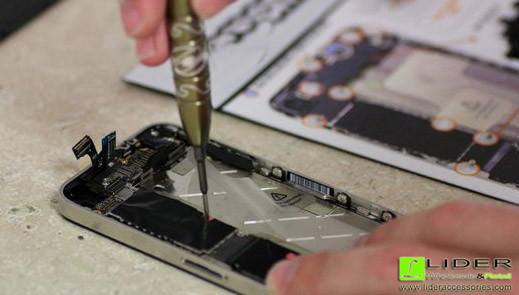
3.Proper installation. As a professional, you have to tend all the parts and the new LCD you are going to install. Of course, the most important, you have to operate in the right way.

Need to know more details about mobile phone accessories, inner replacement LCDs or parts and repair tools? Contact us and we will share more with you.

What capacity shall I buy the Power Bank for my phone?


A Power bank is also known as battery charger. It is used by peopel when they are going out without a Travel charger or Car charger for emergency use. Initially it was powered by dry cell batteries for old Nokia phones without a touch screen. As li-ion battery cell technology developed, it was made up of li-ion battery and Li-polymer battery cells. During this time, the power bank capacity was high and could be used for touch screen smart phones or tablets.

You can find 1800mah, 2500mah, 4000mah, 8000mah , 12000mah Power Bank in retails. So, there goes the question, how can I know the capacity of power bank I am going to purchase? How can I know it will meet my requirement or not? Here we go some useful tips from us:

We buy a power bank with capacity of 4000mah. Normally it would be about 15-20% less for the output capacity, some even good ones only 10% or less loss. Why this happen? The capacity of the power bank is counted only by the battery cell, 4000mah. But the output should go from battery cell to PCB board with circuits and ICs, then to charging cables, then to your phones. During this process, there will be about 20% loss. You are right, it is crazy to know this. So, the real capacity is about 4000mah * (100% – 20%) = 3200mah.

Let’s continue to charge your phone now. If your iphone is 1850mah battery, there should be 3200mah / 1850mah = 1.73 times. We say, 1 time full and 70% the 2nd time.

But, I want to let you know, this is just in theory. Why? Actually in our charging process, the phone is still on. It needs power to support the phone working. Under normal condition, it can only charge this phone 1.4 ~ 1.5 times.

Question: I bought a 4000mah power bank, I can charge my phone with 1800mah battery 2 time FULLY.I am not joking. Why?

Answer: this may caused by the following: 1) the power bank capacity is 4000mah or more, and the loss is less than 20%. It will charge your phone 2 times full. But Lider Industrial Ltd will let you know that, things like you described are very slim. 2) Your phone is 1800mah, but after a year of usage, the real phone battery capacity dropped to 1600mah or even lower, 1400mah. So, 4000mah*80%/1600mah (phone label may say 1800mah) = 2 times full. The 2nd one is the regular rule.

How to Test a Samsung Phone Replacement LCD


There is a service code that you can dial on your phone to access this diagnostic menu and perform different hardware functionality tests for your Samsung phone replacement LCD. You can perform test like screen test including screen colors and Touch functions, Vibration, Receiver, Sensors, Speakers, Keys, front and rear cams, Led lights and more.

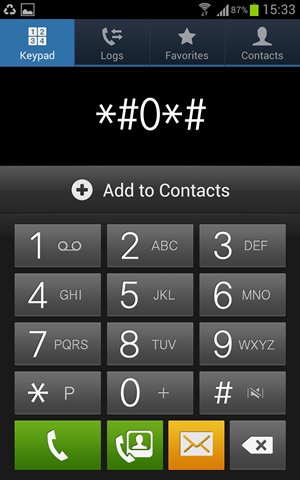
Dial *#0*#  from your phone and you will see the following screen with 15 different hardware test buttons.

Samsung Phone Replacement LCD - Testing Menu

Samsung Phone Replacement LCD – Testing Menu


On below diagnostic menu first row to buttons Red, Green and Blue are the screen color tests that shows any dead pixels of the screen or tinted effect if any.

samsung lcd testing manue

samsung lcd testing manue

Test Phone Receiver : By pressing Receiver button you will hear a beep that shows receiver working fine and if you don’t hear any beep then phone might have problem with its receiver.
Test Vibrator : Vibration button will test the phone vibrator and your phone will vibrate continuously to stop it press the back button or tap the screen.
Screen Dimming Test : Dimming button and you will see phone screen divided with RGB gradient colors, tap again on the screen and screen should be half dimmed, hit the back button two times to go back.
Back/Rear Camera Test : Mega cam button used to test phone’s rear camera, tap this button check the camera view, perform focus test and take a picture.
Sensors Test : Using Sensor button you can perform all sensor test on your phone including Accelerometer, Proximity, Barometer, Lights, Gyroscope, and Magnetic Sensor.
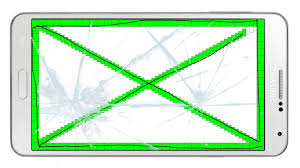
Touch Screen Test : Touch is major test on the phone, tap it and touch each box on the screen to fill it with green color. If all filled with green then screen touch test is passed.
Sleep button will test your phone’s sleeps functionality, once you tap it to test your phone will be in sleep more and you need to wake-up with power or home button.
Speaker Test : Hit the Speaker button to test phone speakers, when you hit the speaker button you will hear repeating sound until you tap this button again.
Phone Keys Test : Sub key button used to test the keys on the right and left sides of the home buttonFront cam is similar to Mega cam button.
LED Light Tests : LED is test to check phone’s alert LED light.Low Frequency button used to perform different LCD frequency tests

Samsung LCD Touch Test

Samsung LCD Touch Test