The Difference Between Charging Cables and Data Cables: What You Need to Know

In a world where our lives are increasingly intertwined with technology, understanding the tools we use every day is essential. Among these tools, charging cables and data cables play crucial roles in keeping our devices powered and connected. However, many people often confuse the two. In this article, we’ll explore the key differences between charging cables and data cables, helping you make informed decisions for your tech needs.

Durable USB C to USB C cables Wholesale

Durable USB C to USB C cables Wholesale

### Understanding Charging Cables

Charging cables are designed primarily to supply power to your devices. These cables vary in design, length, and connector type, but their main function remains the same: transferring electrical energy from a power source to your gadgets. Whether it’s your smartphone, tablet, or laptop, a charging cable ensures that your device stays powered throughout the day.

Most charging cables consist of two main components: the conductor and the insulation. The conductor, often made of copper or aluminum, carries electricity, while the insulation safeguards the conductor from environmental elements and physical damage. Depending on the cable’s specifications, it can support various charging speeds, which might be affected by factors such as cable length, gauge, and connector type.

While most charging cables focus solely on power transfer, some modern cables have been designed to handle both charging and data transfer simultaneously. These dual-purpose cables can provide convenience, allowing you to charge your device and sync data at the same time. However, not all charging cables offer this capability, so it’s essential to check the specifications before making a purchase.

### Delving into Data Cables

On the other hand, data cables are specifically designed for transferring data between devices. They facilitate communication between two electronic devices, enabling activities like file transfer, syncing, and even connecting to the internet. Data cables come in various formats, such as USB, HDMI, and Ethernet, each serving different purposes based on the type of data being transmitted.

The construction of data cables is also pivotal to their performance. High-quality data cables often feature multiple twisted pairs of wires, ensuring that data signals can travel with minimal interference. This is particularly important for high-speed data transfer, where even slight interruptions can result in errors or slow connectivity.

When considering data cables, it’s essential to understand that not all data cables are built equal. For instance, USB data cables can vary significantly in their capabilities—from USB 2.0, which supports lower transfer speeds, to USB 3.1, which can reach astonishing rates suitable for large file transfers and high-definition video streaming. Make sure to choose a data cable that aligns with your specific data transfer needs.

### Key Differences Between Charging Cables and Data Cables

Understanding the fundamental differences between charging and data cables is crucial, especially if you want to optimize the performance of your devices. Here are some of the key distinctions:

1. **Purpose**: As mentioned earlier, charging cables are designed to deliver power, while data cables facilitate communication and data transfer.

2. **Construction**: Charging cables typically have fewer wires, designed mainly for power transmission. In contrast, data cables have more intricate designs with multiple wire pairs to handle data transfer efficiently.

3. **Compatibility**: Not all charging cables can be used for data transfer, and vice versa. While some cables can perform both functions, many are tailored for one primary purpose. It’s important to check the specifications to ensure compatibility with your needs.

4. **Speed**: Charging cables may support various charging speeds (fast charging vs. standard charging) but typically do not influence data transfer speeds. Meanwhile, data cables can vary widely in their data transfer speeds depending on technological standards (USB 2.0 vs. USB 3.1, for example).

### Choosing the Right Cable for Your Needs

With an array of options available in the market, choosing the right cable for your device can be overwhelming. Here are some tips to help you make the best decision:

– **Identify Your Needs**: Consider what you will primarily be using the cable for—charging, data transfer, or both. If you often transfer files between devices, investing in a high-quality data cable is essential. On the other hand, if you’re mainly charging devices, focus on finding a cable that supports fast charging.

– **Check Compatibility**: Ensure that the cable you select is compatible with your devices. Different devices may require specific connectors (like USB-C, Lightning, or Micro-USB), so double-check the specifications before you buy.

– **Look for Quality**: Opt for reputable brands and cables that boast good reviews. Higher-quality cables often last longer and provide better performance, reducing the chances of overheating or malfunction.

– **Consider Length**: Think about how far away your devices will be from the power source. Longer cables offer flexibility but may reduce efficiency, especially for charging. Choose a length that strikes a balance between convenience and effectiveness.

Multi USB data cables wholesale

Multi USB data cables wholesale

### Conclusion

In conclusion, understanding the difference between charging cables and data cables is vital for effectively managing your electronic devices. Charging cables ensure your gadgets remain powered, while data cables facilitate seamless communication and data transfer. By recognizing their distinct purposes, construction, and specifications, you’ll be better equipped to choose the right cable for your needs.

Whether you’re a tech novice or a seasoned enthusiast, having the right cable can significantly enhance your user experience. So next time you’re shopping for cables, remember the key differences and choose wisely! Your devices will thank you for it.

Difference between a 2-pin and 3-pin Plug

Introduction
Electricity is an essential part of our daily lives, and the plugs we use to power our devices play a crucial role in this process. Understanding the difference between a 2-pin and 3-pin plug is essential for anyone who wants to ensure safe and efficient electrical usage. In this article, we will explore the fundamental difference between a 2-pin and 3-pin plug, analyzing their structure, usage, and safety considerations. We will also provide photographs to aid in the understanding process.

Travel Adapter Converter Wholesale

Travel Adapter Converter Wholesale


Structure and Function of a 2-Pin Plug
A 2-pin plug is a simple electrical connector that typically consists of two prongs or pins. These pins are designed to fit into corresponding slots in a power socket or outlet. The structure of a 2-pin plug varies depending on the region and type of electrical system, but generally, they consist of a grounding pin and a live pin.
The grounding pin is usually the larger of the two pins and is designed to make contact with the grounding slot in the power socket. This helps to ensure that any electrical current is safely directed to the ground, preventing shocks or damage to the device. The live pin carries the electrical current from the device to the power source.
In many countries, such as the United States and some parts of Europe, 2-pin plugs are commonly used for small appliances and electronics that do not require a third grounding pin.

Structure and Function of a 3-Pin Plug
A 3-pin plug is a more complex electrical connector that typically consists of three prongs or pins. These pins are designed to fit into corresponding slots in a power socket or outlet, providing additional safety features and functionality.
The three pins in a 3-pin plug usually include a grounding pin, a live pin, and a neutral pin. The grounding pin is similar to the one found in a 2-pin plug, providing a safe path for any electrical current to flow in case of a problem. The live pin carries the electrical current from the device to the power source, while the neutral pin completes the circuit by carrying the return current from the device back to the power source.

The additional neutral pin provides better stability and support for larger appliances or devices that require more power. It also helps to prevent electrical shocks by ensuring that all current flows through the intended path. 3-pin plugs are commonly used in countries where there is a need for additional safety measures, such as Australia, Europe, and many other parts of the world.

Usage and Safety Considerations
The usage and safety considerations for 2-pin and 3-pin plugs vary depending on their application and location. In general, it is important to ensure that the correct type of plug is used in accordance with local electrical standards and regulations.
For 2-pin plugs, it is essential to ensure that they are properly inserted into a matching socket or outlet. It is also important to avoid using damaged or worn plugs as they may pose a safety risk. Properly using 2-pin plugs can help prevent electrical shocks and damage to devices.

On the other hand, 3-pin plugs provide additional safety features that can be beneficial in certain situations. The neutral pin helps to distribute the load more evenly, reducing the risk of overheating or damage to the device. Additionally, the additional grounding provided by the third pin can help prevent electrical shocks in case of a problem with the device or its wiring.

However, even with 3-pin plugs, it is essential to follow safety guidelines such as using matching sockets or outlets, avoiding overloading circuits, and regularly checking for damage or wear on plugs and sockets.

Photographs Analysis
Difference between a 2-pin and 3-pin Plug

Difference between a 2-pin and 3-pin Plug

To aid in understanding the difference between a 2-pin and 3-pin plug, we have included photographs of both types of plugs. Figure 1 shows a typical 2-pin plug with its two pins (grounding and live) visible. As mentioned earlier, this type of plug is commonly used in regions where there is no need for a neutral pin or additional safety measures.

Figure 2 depicts a typical 3-pin plug with all three pins (grounding, live, and neutral) visible. This type of plug provides additional safety features and functionality compared to a 2-pin plug. It is commonly used in regions where there is a need for additional safety measures or where larger appliances require more power and stability.

Worldwide Power Plug

Worldwide Power Plug


Conclusion
Understanding the difference between a 2-pin and 3-pin plug is essential for ensuring safe and efficient electrical usage. A 2-pin plug typically consists of two pins (grounding and live), while a 3-pin plug includes an additional neutral pin for improved stability and functionality. Proper usage and safety considerations should be followed to prevent potential issues such as electrical shocks or damage to devices. Through photographs, we hope you have gained a better understanding of both types of plugs and their respective applications based on local electrical standards and regulations.

Travel out of your country? Take this Universal Travel Adapter with you. Lider focus on mobile phone accessories and travel essentials wholesale.

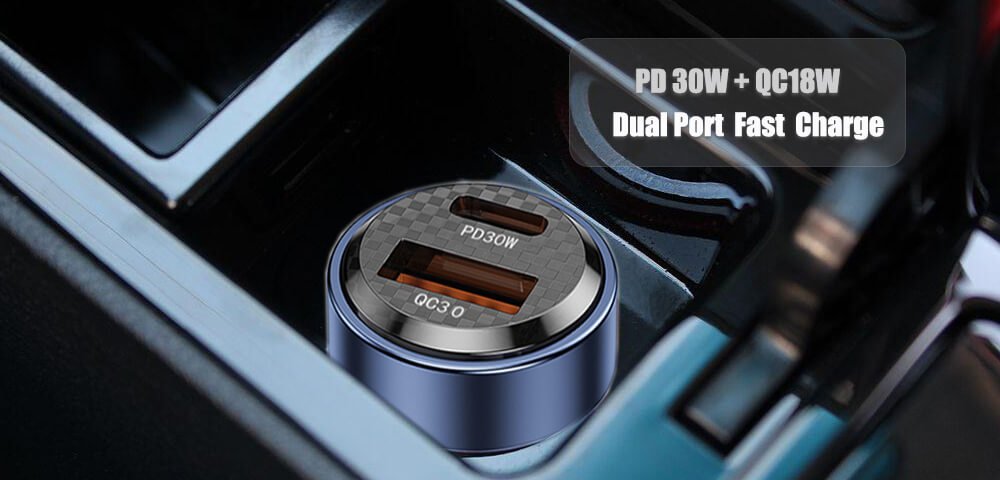
PD+QC Dual Port USB Car Charger

PD+QC Dual USB car Charger
With PD and QC protocol;
USB A + Type C dual port and work at the same time, this means it can charge 2 phones or tablets at the same time;
Mini and compact size;
Check with Lider now for more info!

PD + QC Dual Port USB Car Charger

PD + QC Dual Port USB Car Charger

Buying from a mobile phone accessories manufacturer or trader?

Mobile Phone Accessories purchasing from a manufacturer or a trader? It is a strange question.

Of course, your answer may buy directly from a mobile phone accessories manufacturer because of price. As we all know that, a trade will earn some profit between you and the manufacturer. If from a cell phone accessories manufacturer directly, you can save some costs. Or the supplier can take part of that.

This is a wonderful idea and everybody likes – No middle man inside the deal.

How about a trader? He can offer you variety of mobile phone accessories. The risk is that he may lose control of quality and / or delivery time. The worst is that, the supplier and the buyer both lose – quality, delivery time or the costs.

So let us separate all the mobile phone accessories in 2 different styles.

You have the experience in buying. It is easy. You can order from a cell phone accessories manufacturer directly without any difficulty for mobile phone chargers, protectors covers, data cables, screen protectors or other single products. Your order will meet their MOQ and your buying price will support you private label packages or blank ones. This is good for both of the manufacturer and the buyer. It is even better if you both worked in the past and have known each other very well.

There comes to a condition that the buyer does not have much experience in this and he may have a small order just enough to meet the MOQ or even less than the MOQ of a manufacturer? What shall he do?

Order from a cell phone accessories manufacturer directly for phone covers? He may need MOQ of 300 / 500PCs of Mini order QTY to support him in production. And you have to wait a month or 2 to be shipped. If the factory gets a good name, it will not cost you energy to follow the orders. If it is not experienced, you may have to spend time in communicating with them.

Power Charging Data Cable iPhone Android

Power Charging Data Cable iPhone Android

Mobile Phone Accessories Camera Accessories Wholesale

Mobile Phone Accessories Camera Accessories Wholesale

I strongly suggest you to order from a trader directly in this situation. They are more professional in ordering and scheduling.