The Complete Guide to Memory Card and Card Reader: Choosing the Right Storage for Your Devices

Introduction: The Unsung Heroes of the Digital Age

In an era where we capture life’s most precious moments in stunning 4K resolution and save entire libraries of work and entertainment on devices that fit in our palms, two components work tirelessly behind the scenes: the memory card and the memory card reader. Often overlooked, these tiny pieces of technology are the gatekeepers of our digital lives.

A poor choice in either can lead to disaster—corrupted files, lost vacation photos, a ruined professional shoot, or agonizingly slow transfer speeds that bottleneck your entire creative workflow. Conversely, the right combination acts as a seamless, high-speed pipeline, ensuring your data is safe, secure, and quickly accessible.

This definitive guide will demystify the world of memory cards and readers. We’ll explore the different formats, decode the confusing speed classes, and provide a clear roadmap to selecting the perfect storage solution for your camera, drone, smartphone, or gaming device.

Chapter 1: Understanding Memory Card Formats

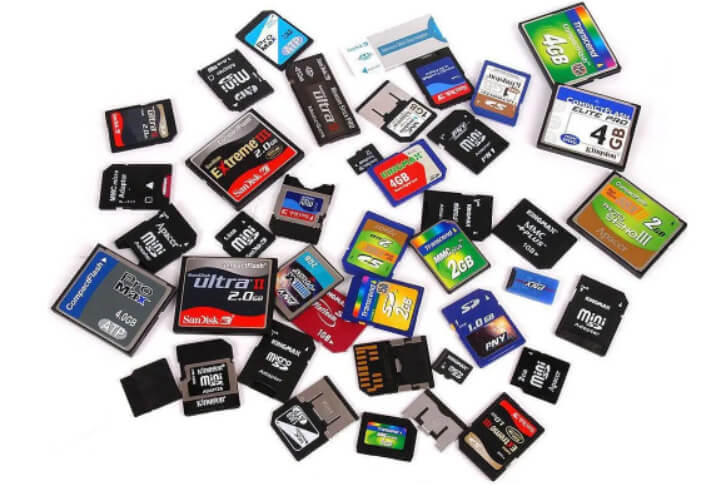
Not all memory cards are created equal. The format you need is determined by the device you use. Here are the most common types you’ll encounter today.

1. SD (Secure Digital) & microSD Cards

The undisputed kings of consumer storage, these are found in everything from DSLR cameras to Nintendo Switches.

  • SD Card: The larger, original form factor. Commonly used in digital cameras, camcorders, and some older laptops.

  • microSD Card: The tiny but mighty variant. It’s the standard for smartphones, drones (like DJI models), action cameras (GoPro), and modern handheld gaming systems. Note: microSD cards often come with an SD adapter, allowing them to be used in devices with a full-sized SD slot.

Within the SD family, there are three capacity-based generations:

  • SDSC (Standard Capacity): Up to 2GB (largely obsolete).

  • SDHC (High Capacity): 4GB to 32GB.

  • SDXC (eXtended Capacity): 64GB to 2TB. This is the current standard for most high-demand users.

  • SDUC (Ultra Capacity): 4TB to 128TB. This is a newer standard designed for future-proofing.

2. CFexpress Cards

The new professional-grade standard, designed for high-performance stills and video cameras.

  • Types: CFexpress Type A (smaller, used in Sony cameras like the A7S III), and CFexpress Type B (larger, used in high-end Canon, Nikon, and Panasonic cameras).

  • Technology: They use the blazing-fast NVMe protocol (the same technology inside super-fast SSDs), offering incredible transfer speeds that are essential for recording 8K video, high-frame-rate 4K, and rapid burst-mode photography.

3. CompactFlash (CF) Cards

The previous professional workhorse. While now being phased out in favor of CFexpress, many professional DSLRs still use them. They are larger, robust, and were once the fastest option available.

Chapter 2: Decoding Memory Card Speed Ratings and Classes

This is the most confusing but critical part of choosing a card. Speed ratings determine if your card can handle tasks like 4K video recording or rapid-fire photography.

1. Speed Class (C)

The original speed rating, denoted by a number inside a “C” (e.g., C4, C6, C10). The number represents the minimum sustained write speed in MB/s. Class 10 (10 MB/s minimum) is the bare minimum for most modern uses, including Full HD video.

2. UHS Speed Class (U)

An upgrade for higher-quality video.

  • U1: Minimum write speed of 10 MB/s (good for HD and Full HD video).

  • U3: Minimum write speed of 30 MB/s (essential for 4K video recording).

3. Video Speed Class (V)

Designed specifically for video recording, ensuring stable performance without dropped frames.

  • V6, V10: For HD/Full HD.

  • V30: For 4K video at standard frame rates. A very common and good value choice.

  • V60: For 4K at 60/120fps and 8K video.

  • V90: For high-bitrate 8K video and high-resolution burst-mode photography.

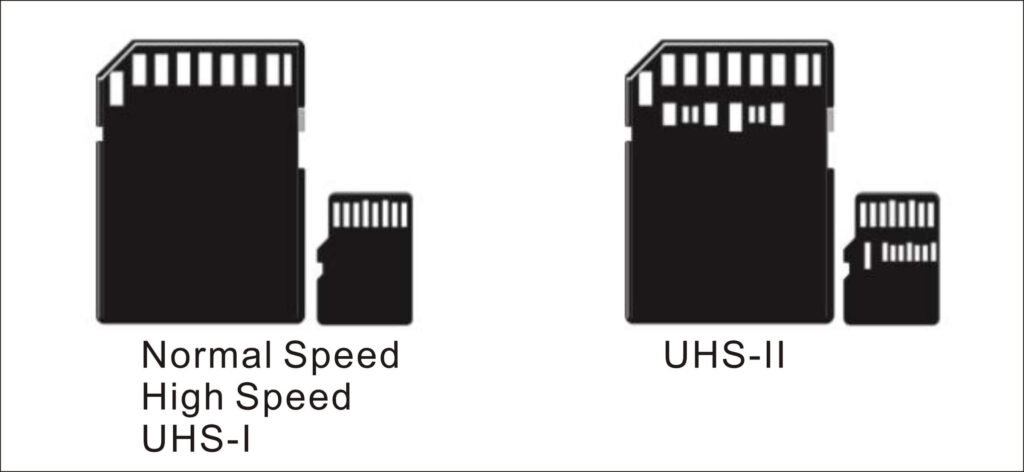
4. Bus Interface (UHS-I vs. UHS-II)

You can identify this by the number of rows of pins on the back of the card.

  • UHS-I: One row of pins. Theoretical max speed of 104 MB/s.

  • UHS-II: Two rows of pins. Theoretical max speed of 312 MB/s. Requires a UHS-II compatible reader to achieve these speeds.

Pro Tip: For 4K video, look for a card rated at least U3 and V30. For higher-end video and photography, aim for V60 or V90.

Chapter 3: The Crucial Role of the Memory Card Reader

Your expensive, high-speed memory card is only as fast as the reader it’s plugged into. Using a cheap, outdated reader is like putting a Ferrari engine in a go-kart.

1. Why a Good Reader Matters

  • Maximizes Speed: A USB 2.0 reader (max ~40 MB/s) will cripple a UHS-II or CFexpress card that can read at over 300 MB/s. You need a reader that matches your card’s potential.

  • Reliability and Data Integrity: Quality readers from reputable brands (like SanDisk, ProGrade, Kingston, Anker) have better controllers and build quality, reducing the risk of corruption during transfer.

  • Multi-Card Support: Many modern readers support multiple card slots (e.g., SD + microSD + CFexpress) simultaneously, allowing you to transfer from different devices without swapping cables or readers.

  • Convenience: Built-in readers on laptops are often slow. An external reader connected via fast USB-C is a massive upgrade.

2. Understanding Reader Interfaces

The port you plug the reader into is just as important as the reader itself.

  • USB 2.0: Avoid for any modern card. Max speed ~40 MB/s.

  • USB 3.2 Gen 1 (formerly USB 3.0/3.1): Max speed 5 Gbps (~625 MB/s). This is the standard for most good readers and is sufficient for UHS-I and some UHS-II cards.

  • USB 3.2 Gen 2: Max speed 10 Gbps (~1,250 MB/s). Necessary to get the full speed out of fast UHS-II and CFexpress cards.

  • USB4 / Thunderbolt 3/4: The fastest available, with speeds up to 40 Gbps. Used by high-end professional readers for transferring massive video files in seconds.

Chapter 4: How to Choose the Right Memory Card and Reader for Your Needs

Matching your gear to your use case is key to avoiding overspending or buying inadequate equipment.

1. The Casual User / Smartphone

  • Card: A U1 or U3 microSD card with 64GB-256GB of storage from a reliable brand like Samsung EVO Select or SanDisk Ultra.

  • Reader: Often, the USB-C to microSD adapter that comes with your phone or a simple, inexpensive USB-A or USB-C reader is sufficient.

2. The Photographer / Videographer (4K)

  • Card: For DSLRs and mirrorless cameras, a UHS-I or UHS-II SD card with a V30 or V60 rating. 128GB-256GB is a good sweet spot.

  • Reader: A USB 3.2 Gen 1 multi-card reader that supports UHS-II if your cards require it.

3. The Professional / Content Creator (High-Bitrate 4K, 8K)

  • Card: CFexpress Type A or B or high-end UHS-II SD cards with a V60 or V90 rating. Capacity of 256GB and above.

  • Reader: A dedicated, high-speed CFexpress reader or a premium multi-slot reader with USB 3.2 Gen 2 or Thunderbolt support. Brands like ProGrade Digital, Sony, and Angelbird are leaders here.

4. The Drone / Action Cam Enthusiast

  • Card: microSD cards are the standard. Due to high-bitrate video, a U3/V30 card is the absolute minimum. For higher frame rates, V60 is recommended. Endurance and reliability are key.

  • Reader: A robust USB-C reader that can handle constant plugging and unplugging.

Table: Memory Card & Reader Recommendations by Use Case

Use CaseRecommended Card TypeRecommended Speed ClassRecommended Reader
Smartphone/Nintendo SwitchmicroSDU1, U3Basic USB-A/USB-C Reader
Beginner DSLR/1080p VideoSDHC/SDXCUHS-I, U1, U3USB 3.2 Gen 1 Reader
Enthusiast Photographer/4K VideoSDXCUHS-I/UHS-II, V30USB 3.2 Gen 1 UHS-II Reader
Professional 4K/8K VideoCFexpress Type B, SDXCV60, V90USB 3.2 Gen 2 / Thunderbolt Reader
Drone/Action CammicroSDU3, V30, V60Durable USB-C Reader

Chapter 5: Best Practices for Longevity and Memory Card Data Security

Your memory card is a temporary vessel, not a long-term archive.

  1. Format, Don’t Delete: Always format your card in the device you plan to use it in (e.g., your camera) after transferring files. This clears the directory and prepares the card for new data, reducing the chance of errors. Never just delete files manually on your computer.

  2. Safely Eject: Always use the “Safely Remove Hardware” option on your computer before unplugging your card reader.

  3. Buy from Reputable Sources: Counterfeit cards are rampant online. Buy from authorized retailers (e.g., Amazon directly, B&H, Adorama) to avoid fakes that report false capacities and fail prematurely.

  4. Store Properly: Keep cards in a protective case, away from moisture, extreme heat, and magnets.

  5. The 3-2-1 Backup Rule: For critical data, have 3 copies total, on 2 different media types (e.g., memory card + external hard drive), with 1 copy off-site (e.g., cloud storage).

Conclusion: Invest in Your Digital Pipeline

Choosing the right memory card and reader is not just about storage; it’s about building a reliable, high-performance pipeline for your digital content. By understanding the formats, speed classes, and technology behind these essential tools, you can make an informed decision that protects your data, enhances your workflow, and unlocks the full potential of your devices.

Don’t let your gear be bottlenecked by slow, unreliable storage. Invest in quality components from trusted brands, and you’ll enjoy a faster, more secure, and more efficient creative process for years to come.

Ready to upgrade your setup? Use the knowledge from this guide to compare top-rated memory cards and readers from leading brands today!
Research Report: MicroSD and TF Cards Wholesale Market Analysis

Executive MicroSD and TF cards Summary

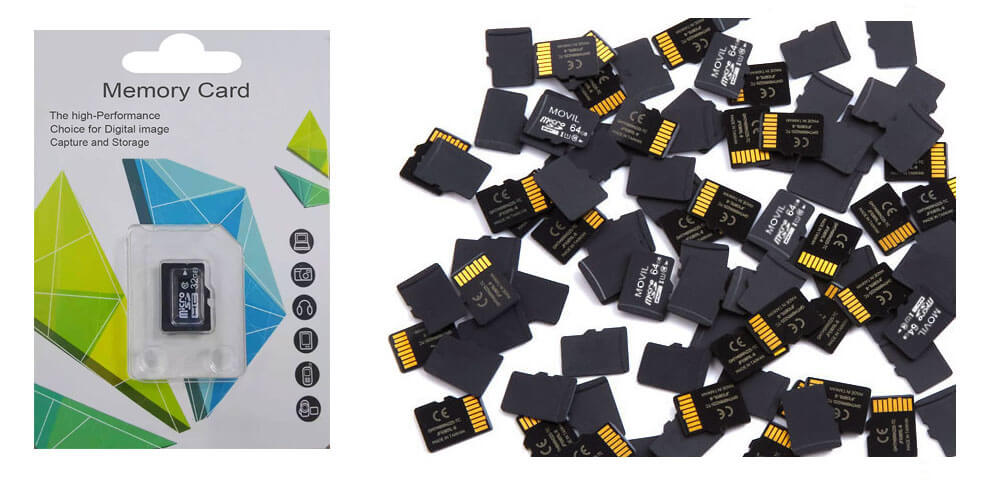
The global MicroSD (Micro Secure Digital) and TF (TransFlash) cards wholesale market has experienced significant growth over the past decade, driven by escalating demand for portable storage solutions across consumer electronics, automotive, surveillance, and industrial sectors. This report provides a comprehensive analysis of the wholesale ecosystem, including market size, key players, pricing trends, supply chain dynamics, and emerging opportunities. With a focus on bulk procurement strategies, manufacturing hubs (notably China), and evolving technological standards, this study equips wholesalers, distributors, and OEMs with actionable insights to optimize their market positioning.

MicroSD TF Cards wholesale

MicroSD TF Cards wholesale


1. Introduction

1.1 Definition and Scope

  • MicroSD vs. TF Cards: Clarifying terminology (TF cards, introduced by SanDisk in 2004, were later rebranded as MicroSD under the SD Association’s standardization).
  • Applications: Smartphones, dashcams, drones, IoT devices, gaming consoles (Nintendo Switch), and embedded systems.
  • Wholesale Market Segmentation: By capacity (32GB–1TB), speed class (UHS-I, UHS-II, A1/A2), end-use industry, and distribution channel (B2B platforms, trade shows, OEM contracts).

1.2 Objectives

  • Analyze pricing strategies for bulk purchases.
  • Evaluate the dominance of Chinese manufacturers in global supply chains.
  • Forecast demand trends linked to 4K video, 5G, and AI-driven devices.

2. Global Market Overview

2.1 MicroSD and TF cards Market Size and Growth (2023–2030)

  • 2023 Valuation: $5.2 billion (MicroSD/TF cards wholesale), CAGR of 8.7% (2024–2030).
  • Demand Drivers:
    • Proliferation of high-resolution cameras (dashcams, bodycams).
    • Expansion of budget smartphone markets (Africa, Southeast Asia).
    • Automotive infotainment and telematics systems.

2.2 Regional Analysis

  • Asia-Pacific (45% market share): China dominates manufacturing (70% of global output), with hubs in Shenzhen, Shanghai, and Hong Kong. Key buyers: Indian and Vietnamese OEMs.
  • North America (25%): High demand for UHS-II cards (4K surveillance, gaming). Major wholesalers: Ingram Micro, Synnex.
  • Europe (20%): Strict compliance with RoHS/CE standards; growth in industrial IoT applications.
Memory Cards MicroSD TF wholesale China

Memory Cards MicroSD TF wholesale China


3. Supply Chain and Manufacturing Landscape

3.1 Key Players in Wholesale

  • Tier 1 Manufacturers: Samsung, SanDisk (Western Digital), Kingston, Lexar (Longsys), Toshiba Kioxia.
  • Chinese OEM/ODM Suppliers: Netac, TECLAST, PNY Technologies (Shenzhen-based factories), providing low-MOQ (500–1,000 units) customization.
  • Distributors: Amazon Business, Alibaba B2B, DHgate, specialized electronics wholesalers.

3.2 Cost Structure Analysis

  • Components: NAND flash memory (60% of cost), controllers, packaging.
  • Wholesale Pricing:
    • 32GB Class 10: $1.20–$1.80/unit (MOQ 10,000).
    • 256GB UHS-I A1: $8.50–$12.00/unit (MOQ 5,000).
    • Premium 1TB UHS-II: $85–$120/unit (MOQ 1,000).

3.3 Quality and Compliance Challenges

  • Counterfeit Mitigation: RFID tagging, holographic packaging, and blockchain-based verification (e.g., Kingston’s anti-fraud system).
  • Certifications: SD Association compliance, waterproof/dustproof (IP68), extreme temperature resilience (-25°C to 85°C).

4. Wholesale Procurement Strategies

4.1 Sourcing Models

  • Direct Factory Contracts: Negotiating with Chinese ODMs for branded/white-label production.
  • B2B Marketplaces: Alibaba.com, Made-in-China.com (average 15–30% lower pricing vs. Western distributors).
  • Trade Shows: Canton Fair, CES (Las Vegas), and IFA Berlin for networking with Tier 2 suppliers.

4.2 Logistics and Inventory Management

  • Shipping: Air freight for urgent orders (3–5 days) vs. sea freight (30–45 days) for cost-sensitive bulk.
  • Tariffs: US Section 301 tariffs (25% on Chinese imports) incentivizing Southeast Asian diversification (e.g., Thai/Vietnamese assembly).

5. Emerging Trends and Opportunities

5.1 High-Performance Storage Demands

  • 4K/8K Video: UHS-II/UHS-III cards with V60/V90 speed classes (min. 60MB/s–90MB/s write speeds).
  • A2 App Performance: Random read/write speeds for Android apps (e.g., GoPro’s recommended specs).

5.2 Niche Markets

  • Automotive: MIL-STD-810G-certified cards for dashcams (Tesla, Bosch partnerships).
  • Industrial IoT: SLC NAND cards for write-intensive applications (10+ year endurance).

5.3 Sustainability Initiatives

  • Recycled Materials: Bio-based plastics in packaging (SanDisk’s EcoLine series).
  • Refurbished Cards: Wholesale markets for recertified industrial-grade cards.

6. Risk Analysis

  • Price Volatility: NAND flash oversupply (2023–2024) leading to 20% price drops.
  • Geopolitical Risks: US-China tech decoupling impacting semiconductor supply chains.
  • Technological Disruption: Cloud storage adoption vs. edge storage needs.

7. Future Outlook (2025–2030)

  • AI-Driven Forecasting: Dynamic pricing algorithms for wholesalers.
  • Advanced Packaging: 3D NAND stacking for 2TB+ MicroSD cards.
  • 5G Synergy: Real-time data caching in smart cities/autonomous vehicles.

MicroSD TF cards Chinese manufacturers

MicroSD TF cards Chinese manufacturers

8. Conclusion

The MicroSD/TF memory cards wholesale market remains a high-growth, competitive arena shaped by innovation and cost-efficiency. Wholesalers must prioritize partnerships with compliant Chinese Memory Cards manufacturers, adopt agile procurement models, and align inventory with emerging tech trends (UHS-II, A2, industrial IoT). By leveraging data-driven logistics and diversification strategies, stakeholders can capitalize on the $8.3 billion market opportunity projected by 2030.


Appendices

  • Appendix A: Top 20 MicroSD/TF Card Manufacturers in China (2024)
  • Appendix B: Sample Wholesale Price List (MOQ Tiers)
  • Appendix C: Compliance Checklist (CE, FCC, RoHS)

How to Choose Memory Card – Understand Words and Symbols on it

Memory Cards

Memory Card plays a very important role in our digital life. There are many words or symbols on the cards no matter SD cards or MicroSD TF cards. What are they? And what does they means? Let us check the memory card words and symbols today. 

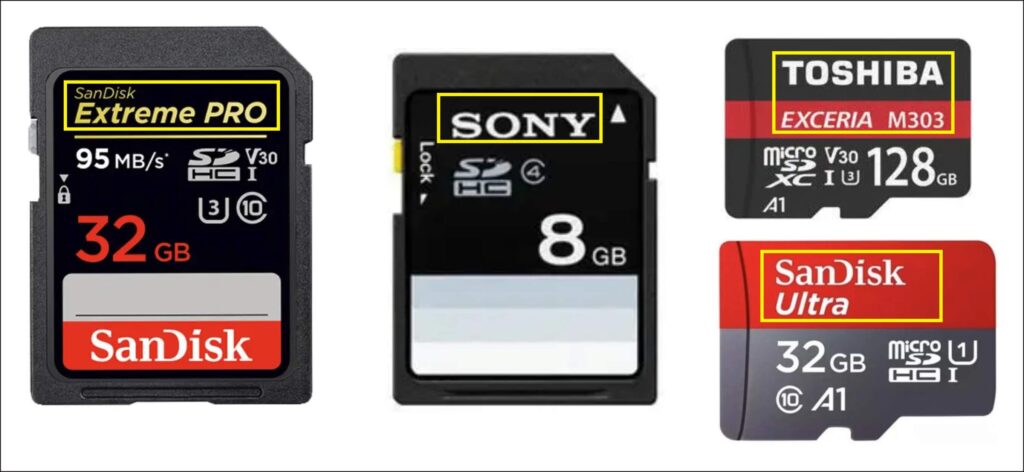
1. Brand name and product code

Memory Card SD Micro SD TF

Easy to see the brand name holder or manufacturer. Some will put the item# or product ID, too. 

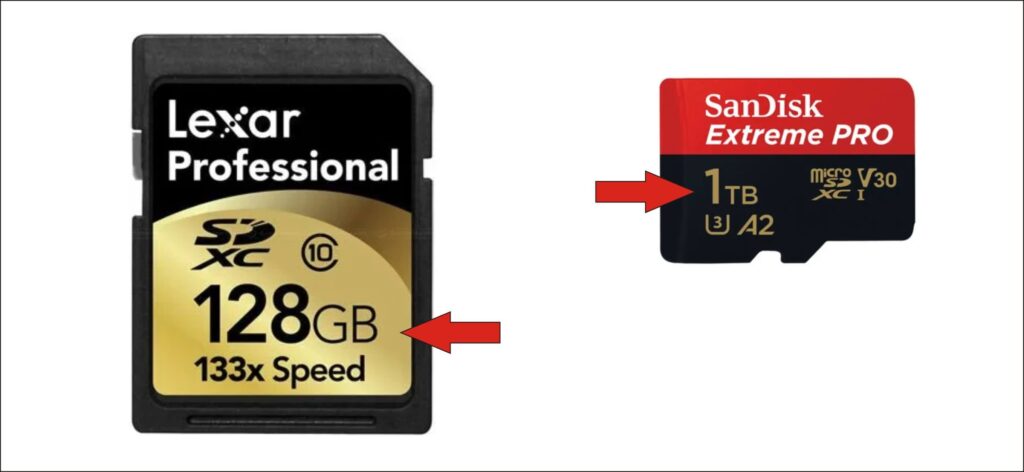
2. Memory Card Capacity

Memory Card Capacity

It is the first thing many people will check before buying a memory card. And it is also easy to read and know the difference. 

3. Speed XX MB/S on Memory Card

Memory Card Speed

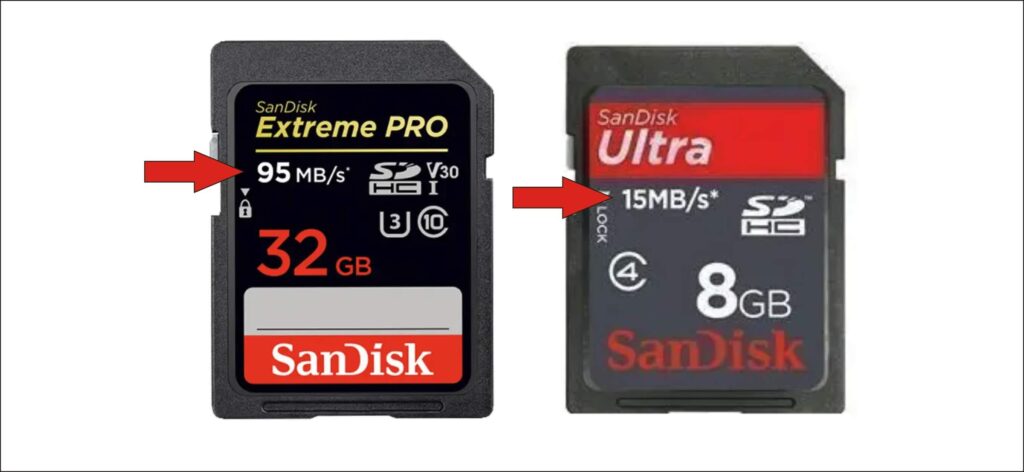
We know that XX MB/S indicate the speed. But we should attention that the speed marked here is the max read speed. Yes, Max Speed Read. It cannot keep the same maximum speed as always. It will be high or low with a peak read speed as said on the card. 

Actually the write speed is even more important than the read speed for videos. So does the capacity. 

4. SD, SD-HC, SD-XC and SD-UC

SD TF HC XC
Micro SD TF Card HC XC symbol

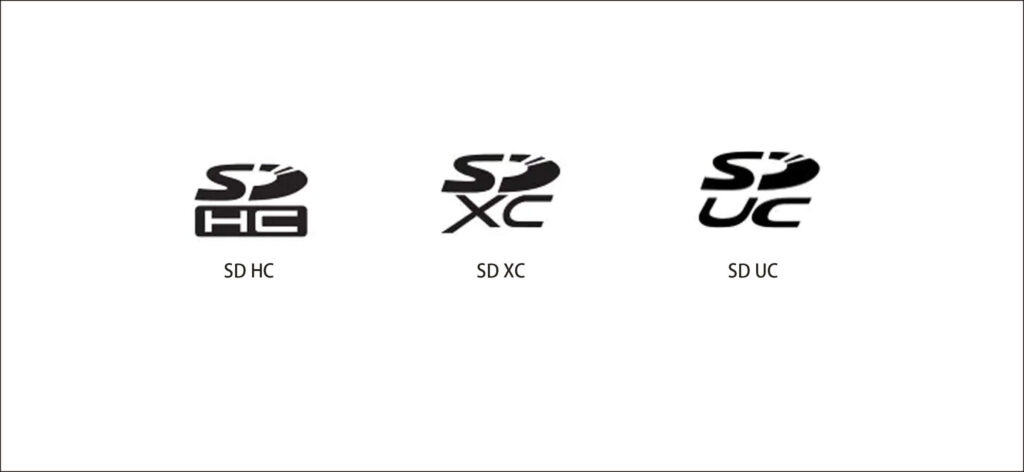
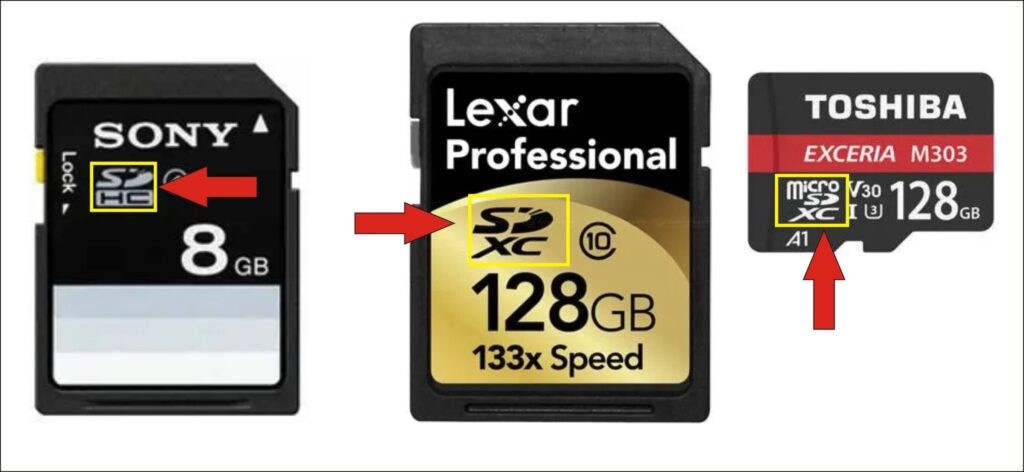
We could not get so many SD cards in our daily life now. An SD card is with a max storage of 2GB. That isn’t a good choice for our big data times. But we could see the same size SD cards marked with SD-HC and SD-XC. 

SD-HC is SD High Capacity. It is a high capacity with max 32GB. 

But that is not enough. So there goes SD-XC. It is SD EXTENDED Capacity. It is with a Max 2T capacity and a speed 300M/S. 

It is the same if I buy 32GB SD card SD-HC and 32GB SD card HD-HC for videos? What is your idea? 

The answer is, NO. They are not the same for camera video record. SD card SD-HC is with FAT32 file system. The video files will be divided into 2 files if it is 4GB or more. SD-XC is with exFAT file system. It is only one video file. That is convenient in videos editing. 

SD-UC, it is said that this SD card can reach 128T Max capacity. 


5. Memory Card Speed Class

Micro SD C2 C4 C6 C10 Speed

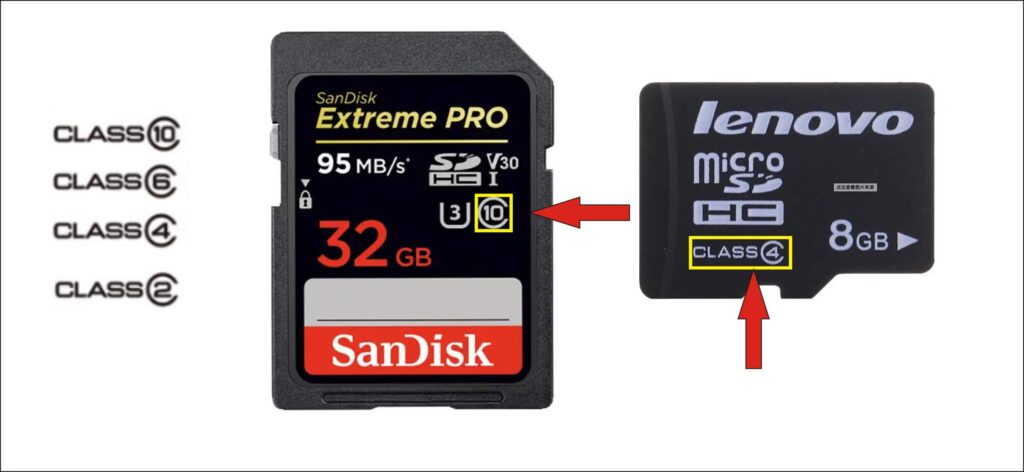
We can see C2 C4 C6 C10 on cards. This shows the speed class write to the card. 

C10 means the Minimum Sequential Write Speed is 10M/S. 

Blow is the Speed Class with the the Speed Write for your reference. 

Speed Class
Speed Write
Remark

Class0

No details

Under C2, or no details

Class2

2M/S

Photos

Class4

4M/S

HDTV, Photos

Class6

6M/S

Cameras, Videos

Class10

10M/S

HD, Full HD videos

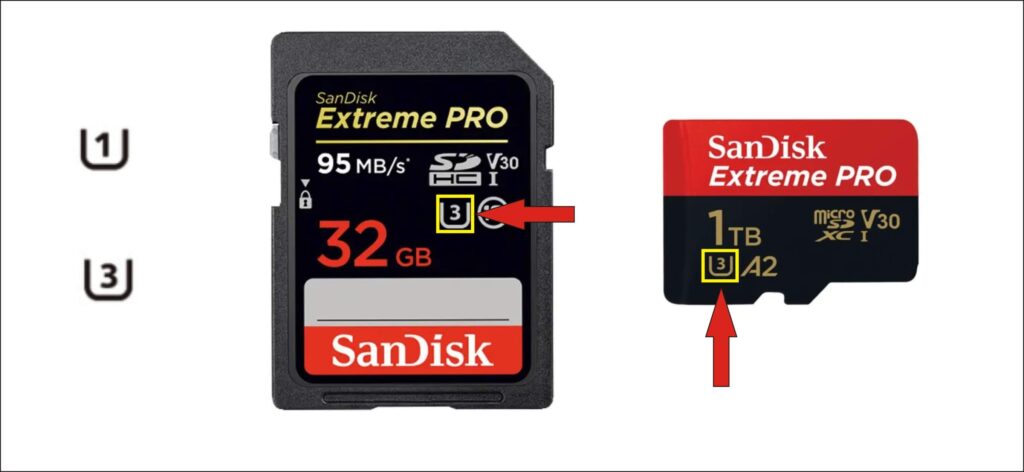
6. Memory Card Symbol U1 U3

Micro SD TF speed U1 U3

U1 = speed write ≥ 10M/S, Good for HD Full HD videos.

U3 = speed write  30M/S, Good for 2K 4K video record.

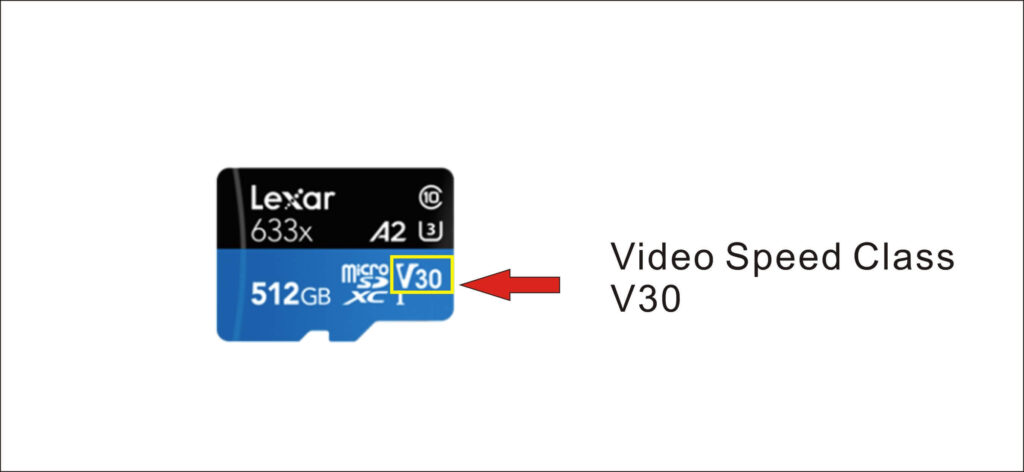
7. Memory Card Speed V30 V60 V90

MicroSD TF card Speed Wite

V-X is also for speed. This is the video record speed standard. V30 means minimum 30M/S speed write speed.This V-series data is very important for video recorders. 

V level speed
Speed Write
Videos

V90

90M/S

8K video record

V60

60M/S

4K video record

V30

30M/S

Full HD 1080+, 4K video

V10

10M/S

HD Videos, 1080P

V6

6M/S

HD videos

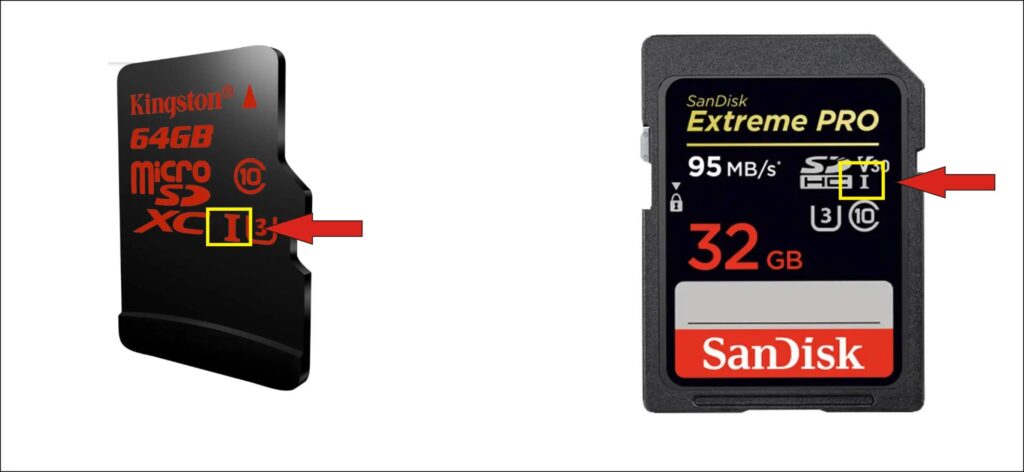
8. Memory Card Speed I, II and III

MicroSD TF SD Card I

These numbers will show up with V-series number. There are 3 different numbers for memory cards as I,II and III.

I is for UHS-1, Ultra High Speed Class 1.

V60, V90 meets the standard II and III. While V10 V30 is under standard I.

There is also a visual diffrence for these. You can see the contacts for reference.

Memory Card Micro SD TF UHS I II

USH-1 is with a max speed ≤ 104M/S, USH-2 ≤ 312M/S, USH-3 ≤ 624M/S.

There is no I, II or III on the card. What is speed? It is 25M/S Max. 

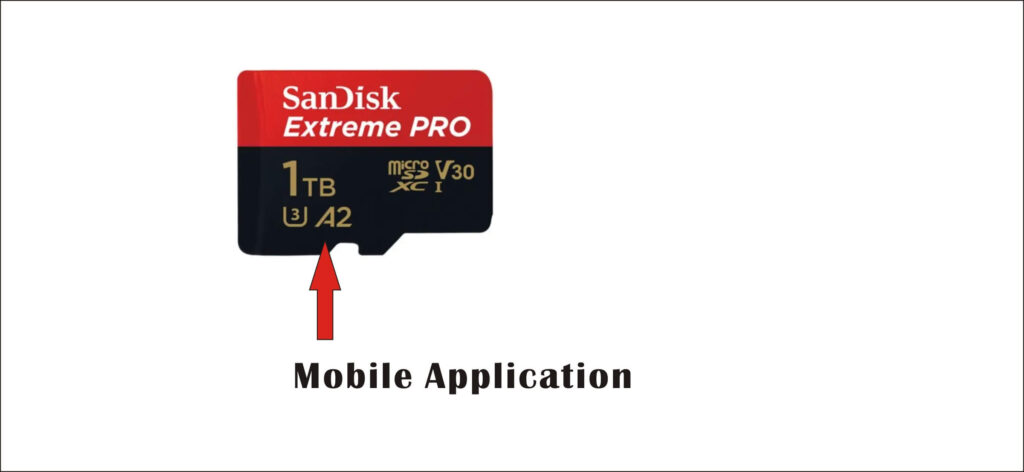
9. Micro SD TF A1 and A2

MicroSD TF Card A2

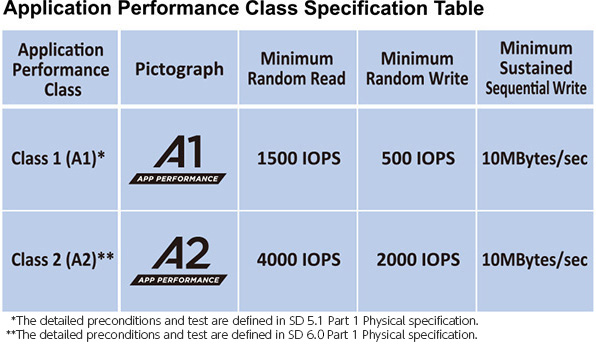
MicroSD cards mark with A2-class. This means that the Micro SD card meet the particular standard for smart phones that need additional storage space for applications. Both of APP Performance A1(A1) and APP Performance A2(A2) are with minimum Sequential write speed 10M/S. Class A1 is with 1500 IOPS and 500 IOPS. Class A2 reaches 4000 IOPS and 2000 IOPS. A2 is much better for performance of smart phone Application.

Check details as below for Mobile Application Performance Speed

Application Performance Speed

If you think your friends or network would find this useful, please share it with them – I’d really appreciate it. 

All items shown here with various trademarks, brand names and logos are for reference purpose only. We do not own, manufacture or sell them. They are the property of their owners.